Find the Pinterest angle.
Type a topic. Discover finds what people are searching for on Pinterest around it, and ranks the ideas against the brand it learned from your own Pinterest account.
Sits in Chrome’s side panel. Never reads the pages you browse. Never pins for you.
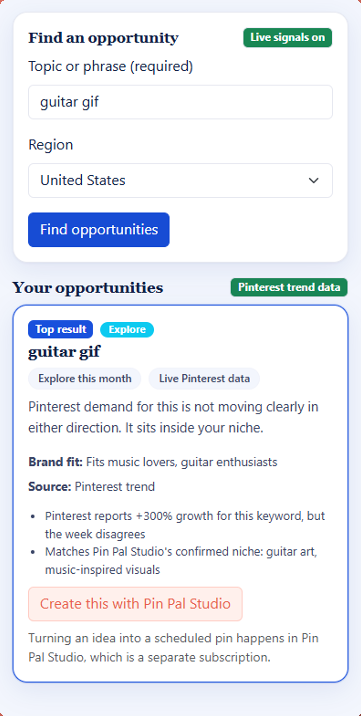
From a topic to ideas that fit your brand.
It learns your brand from your boards
Connect Pinterest and pick the boards that represent your business. Discover reads them and drafts a brand profile, telling you what it was built from. You check it, change what’s wrong, and save it.
Type a topic and pick your region
Anything you might pin about. Discover asks Pinterest what people are searching for around it, and what’s rising in your region.
Get ideas ranked for your brand
The ideas that fit your brand come first, each with the evidence behind it. Pick one and make the pin.
- Demand
- Not moving clearly in either direction this month.
- Brand fit
- Fits music lovers and guitar enthusiasts.
- Source
- A Pinterest trend, checked against your saved profile.
Every idea shows why it’s there.
It stays in its lane.
A Chrome extension can ask for a lot. Discover asks for very little.
No access to your tabs, your browsing or any website’s content. It only talks to Pin Pal’s own server.
Discover finds ideas. What you make and publish stays your decision.
It uses Pinterest’s official API, through the account you connect, with your permission.
Your Pinterest connection is held securely on our server, never in the extension.
The detail is in section 7 of our privacy policy.
Discover finds what to make. Studio makes it.
| Feature | Pin Pal Discover | Pin Pal Studio |
|---|---|---|
| Price | $9 USD/mo | from $19 USD/mo |
| Best for | You make your own pins and want to know what to pin next | You want the pins made, scheduled and improved for you |
| Ideas for your brand | Yes, from any topic you type | Yes, plus seasonal planning and trend timing |
| Makes the pins | No | Yes: titles, descriptions, pictures, carousels |
| Schedules and publishes | No | Yes, at a safe pace, after your approval |
| Where it runs | Chrome’s side panel | In your browser at app.pinpalstudio.au |
- Ideas from any topic, ranked against your brand
- What’s rising in your region, and searches built from your brand
- A brand profile drafted from the boards you choose
- The evidence behind every idea
Monthly · Cancel any month · Pin Pal Studio is a separate subscription
Before you install
Do I need Pin Pal Studio?
No. You sign in with your email — Discover sends a six-digit code, there is no password — and subscribe to Discover on its own. Studio is a separate subscription if you later want the pins made for you.
Do I need a Pinterest account?
Yes. You connect one so Discover can learn your brand from your boards. Boards with pins in them give it the most to work from.
What if my brand profile is wrong?
You see it before it’s saved, along with what it was built from — for example “Built from 30 pins across 1 board” — and you can change any line.
Which regions does it cover?
You choose the region for your searches, so the ideas match your market.
How do I cancel?
From the extension’s billing screen, any month. Questions about a charge go to support.
Is this made by Pinterest?
No. Pin Pal Discover is not affiliated with, sponsored by, or endorsed by Pinterest.