One place for your whole Pinterest — so you can stop stitching multiple apps together.
Pin Pal Studio does the strategy, the drafting, and the safe publishing — while you keep the tools you love for everything else.
How many apps does your Pinterest actually need?
Right now, probably several. An app for the drafting. An app for the images. An app for the scheduling. Another for the analytics. And you — moving things between them, remembering context, keeping the brand consistent, filling the gaps.
Pin Pal Studio pulls the strategy, drafting, and safe publishing into one place. It doesn't replace the tools you love — your favourite design app, your chat AI, your camera roll — it replaces the stitching. The tools that were doing real work stay in your stack. The tabs, the copy-pastes, the "wait, what did I do last time" — those go.
Your Pinterest strategy shouldn't stop when you close your laptop.
Pin Pal Studio holds your brand in memory. Watches your blog for new posts and drafts pins the moment one publishes. Paces approved pins out at safe rhythms Pinterest actually rewards. Publishes on your calendar, not on your presence.
You come back to a review queue of drafts waiting for your judgment — not a blank slate asking what you want to work on today.
The part that needs to run between your sessions.
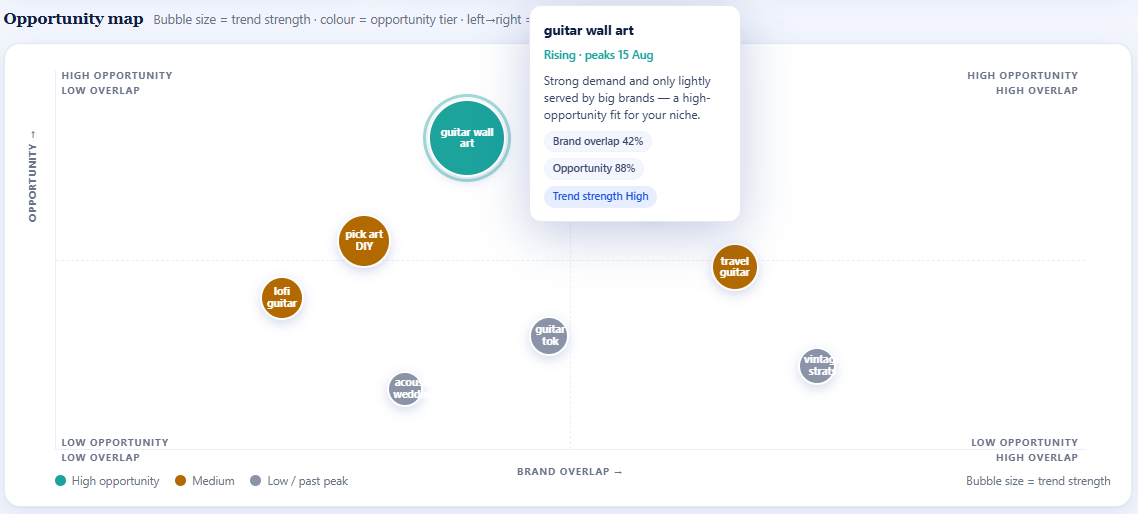
Pin Pal Studio's Opportunity Map plots live Pinterest trends against how well each one fits your brand — so you can see, in one glance, what's worth your effort this week. Your pin performance flows back into the platform's memory: what worked, what didn't, what to try next. Over time, it stops being generic advice and starts being your own data, telling you what to do next.
This is the part that only works when it runs continuously. Because it needs to remember, watch, learn, and connect — not just respond.
It learns your brand, drafts the pins, and waits for your yes.
It learns your brand first
Pin Pal Studio takes in your niche, your voice, your audience and your visual style — then grounds every draft in that. The output sounds like you.
It drafts the whole pin
Titles, descriptions, alt text — grounded in your brand. Bring your own photos, or connect an OpenAI key to have Pin Pal Studio generate the images too, on-brand and thumbnail-legible. Either way, you get finished pins ready to review.
You approve every pin
Nothing publishes without your yes. Each draft lands in your review queue first. Edit anything, regenerate just one that isn't right, or reject the batch and start over. You decide what represents you.
Nothing publishes until you say so — and fixing it is this easy.
Every draft lands in a two-pane review queue — the list beside the pin you're looking at. Approve some, reject the rest, per pin, not all-or-nothing. It won't even let you approve a pin that's missing a board or a broken link.
Don't like something? Ask Lumi to revise it in plain words, or edit the working copy directly — compare it against the original side by side before you save. Regenerate just the image, revert it, or replace it yourself. Change one pin and only that pin changes — nothing else gets touched, or re-billed.
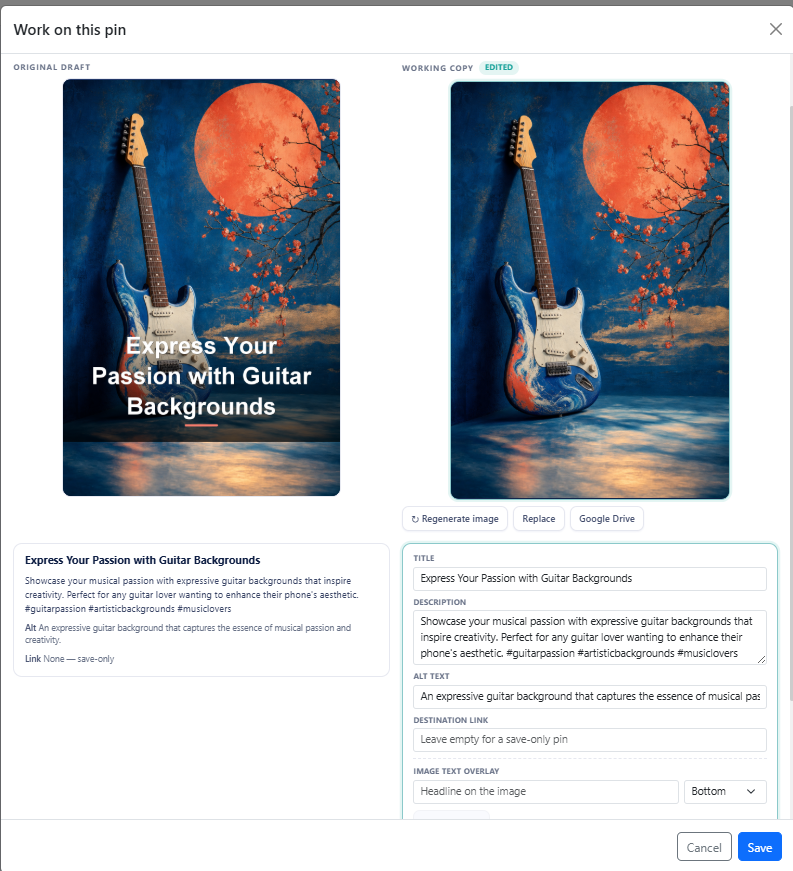 Regenerate the image, keep the copy — original vs. working copy, side by side
The title goes on the image — cleanly.
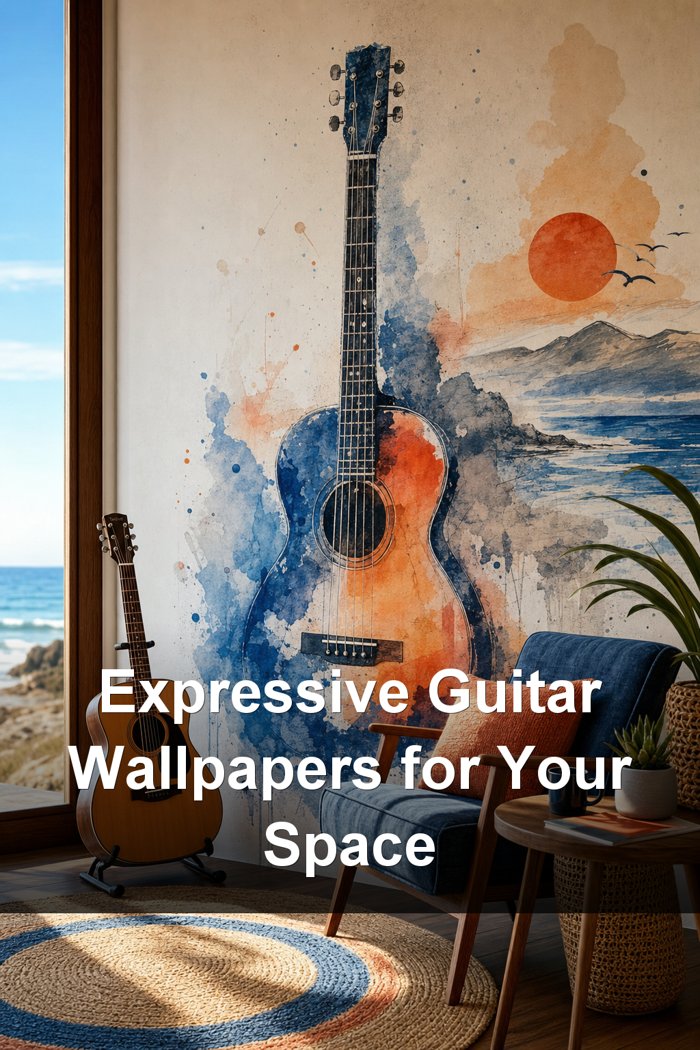
Pin Pal Studio generates the image from your brand context, then sets the title in real typography on top of it. The result is a pin in your brand's voice, with words that are actually legible at the size people scroll past.
Generated pin with a clean title overlayYour colours, your style — on every image.
Set your primary and accent colours, describe the look in plain words ("bright and airy, natural light"), and optionally nudge it toward an archetype — Coastal, Japandi, Minimalist, Vintage and more. Every generated image is grounded in your brand kit, not a generic AI look.
Same brand, same product idea, two different archetype tags — the results are genuinely distinct, not just a colour swap.
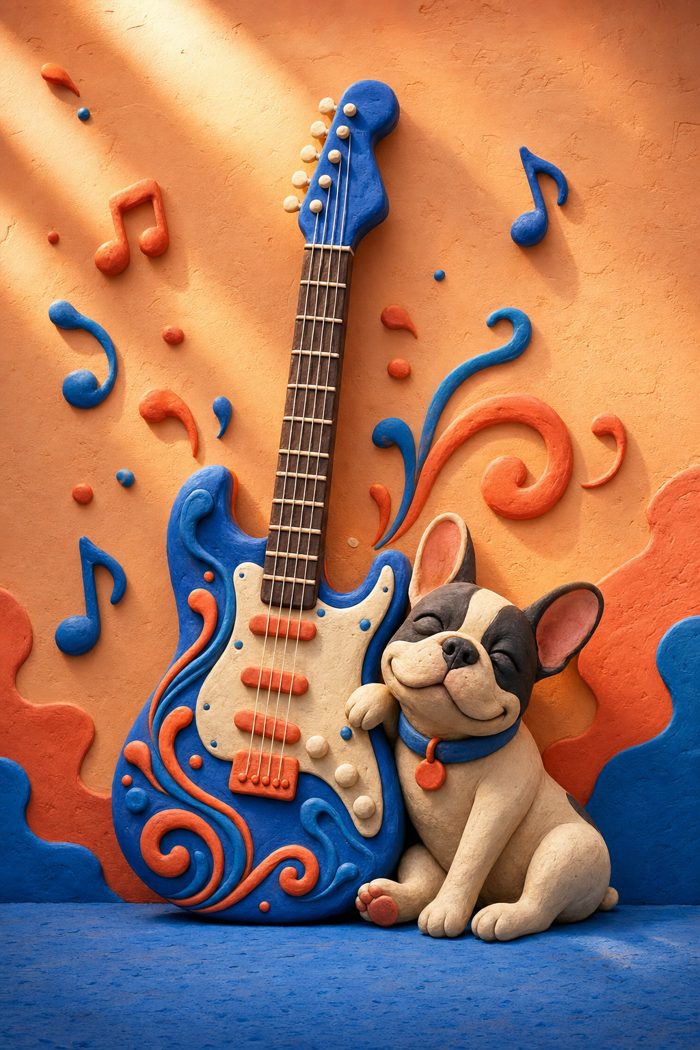
 Same brand kit, two archetype tags — Claymation (left), Coastal (right)
You choose the pace. It keeps every pin inside a safe window.
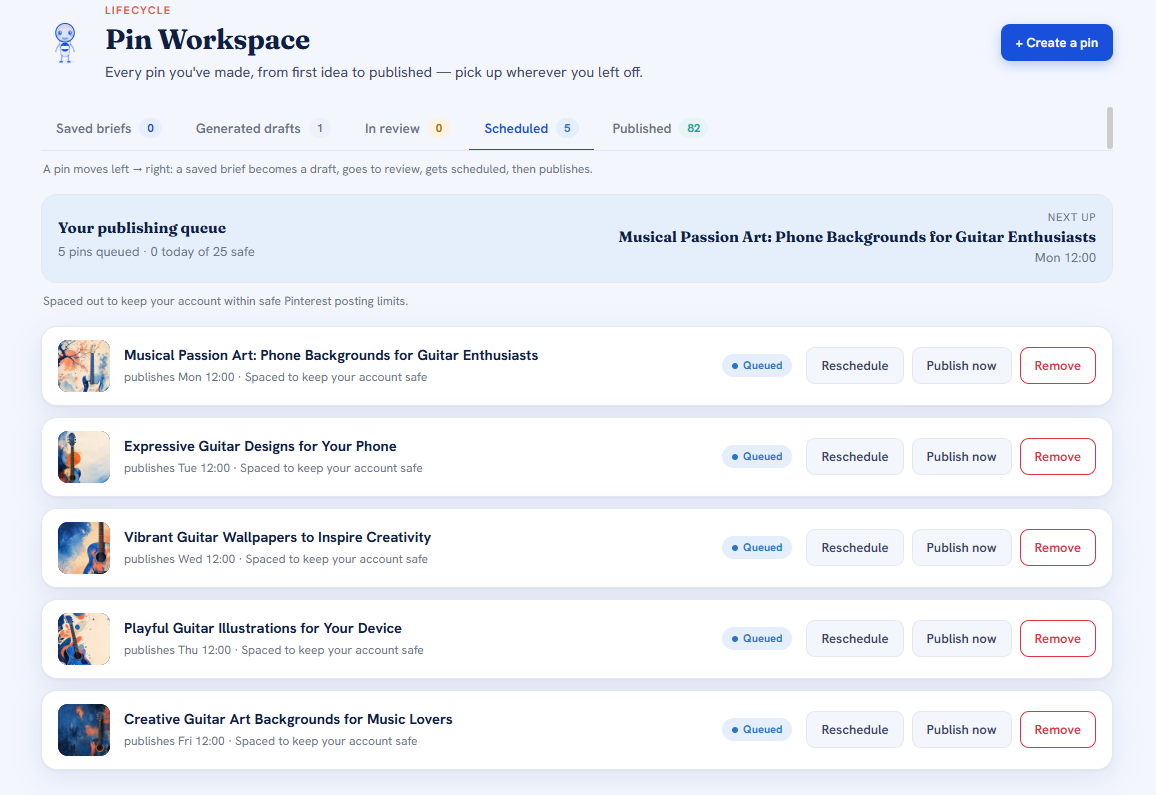
Spread a batch across the week, lean into your audience's best posting times, or set a specific start time yourself. However you schedule it, Pin Pal Studio paces the actual publishing — so a five-pin batch doesn't land on Pinterest as a five-pin burst. New accounts get a gentler ramp while they're new, since that's exactly when bursting gets an account flagged.
It also watches for near-duplicates as it goes: an exact repost gets blocked outright, a near-identical variation gets flagged before it publishes, and if you ever queue something into a crowded slot, it tells you before it happens — not after.
Real scheduling control that happens to keep your account safe, not a safety net bolted on top of none.5 queued, spaced to keep your account inside its safe daily limitIt checks your results against your goal, and tells you what to fix.
Pin Pal Studio looks at your whole pin history, not just a highlights reel — and judges every pin against your own results, not a generic benchmark. It works out what your best-performing pins actually have in common, in plain language, not advice you could have googled. When there isn't enough evidence to say something with confidence, it says so, instead of guessing.
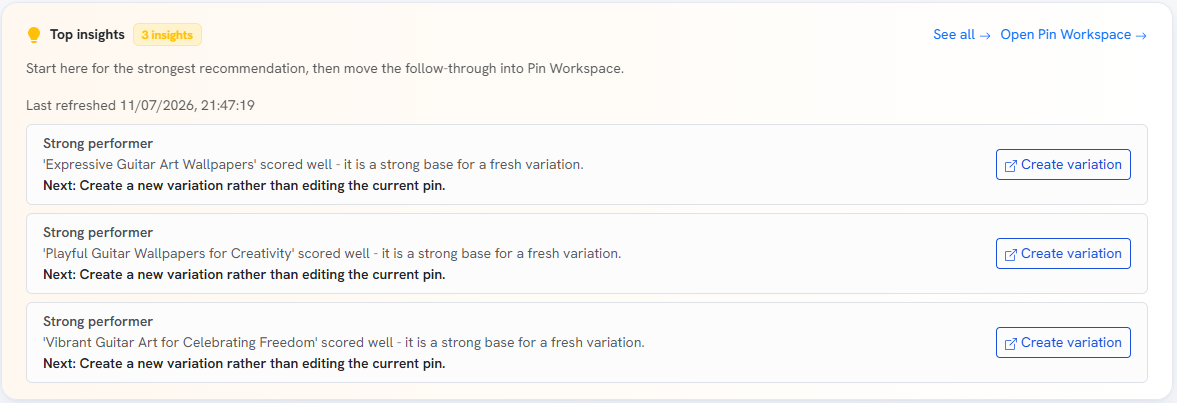 Top insight & suggestion cards, each with a reason and an action
Everything else that's already built in.
Board setup with Lumi
Lumi proposes a starter board structure from your brand and checks your existing boards for search quality. It remembers your decisions, so it doesn't nag.
Five lenses
Tell Discovery how you want to approach this — brand-led, traffic-led, product-led, lead-gen, or trend-led — and every recommendation reshapes around that goal.
Keyword intelligence
Demand, competition and opportunity per keyword, with saved snapshots so you can see how a keyword moved over time.
Seasonal planning
Upcoming seasonal and holiday windows matched to your keywords — region-aware, tuned to your actual market, not America's.
Image-led pins Growth
Upload a photo and Lumi writes five ready-to-publish pins from what it actually sees in the image — a genuine vision feature, not a caption generator. Available on Growth; Starter uploads a photo and you write the copy.
Auto-reframe to Pinterest's shape
A widescreen thumbnail or a square product shot gets recomposed onto Pinterest's vertical canvas with a blurred fill — no stretching, no distortion.
Ask Lumi to revise
Describe the change in plain words and Lumi rewrites the copy, the image, or both. Change one pin and only that pin changes — the others aren't touched, or re-billed.
Cost preview before you spend
"This run will generate N images, roughly $X" — shown before it runs, every time. Image generation is optional and overridable per run.
One content library
Articles, products, lead magnets, videos, images, GIFs — add one, then launch the matching pin recipe straight from it.
Encrypted by default
Everything you store is encrypted (AES-256). Your Pinterest and OpenAI credentials are never held in plain text.
In-app, not inbox
An "actions needed" bar tells you when something needs attention — like a stale Pinterest connection — instead of a mailbox full of digests.
Just want to know what to pin next?
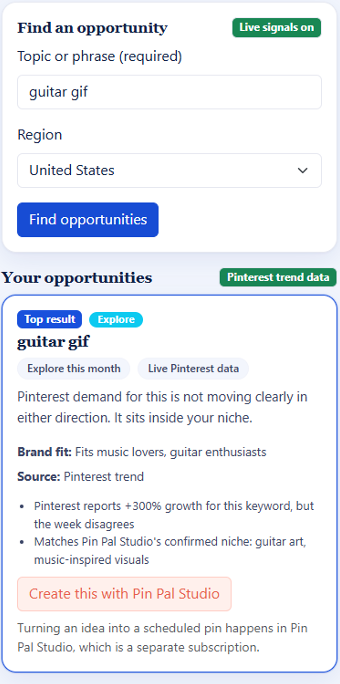
Pin Pal Discover sits in Chrome's side panel. Type a topic and it finds what people are searching for on Pinterest around it, then ranks the ideas against a brand profile learned from your own Pinterest account. Each idea shows the evidence behind it, so you can judge it rather than take it on trust.
It doesn't read the pages you browse, and it never posts or pins for you. When you're ready to turn an idea into finished, scheduled pins, that's what Pin Pal Studio is for.
Two plans. Lumi's intelligence is included.
All of Lumi's thinking — brand learning, discovery, copywriting, analytics — is on us. You only bring your own OpenAI key if you want AI-generated pin images. Everything else runs with no key, no setup.
Intelligence, included. Image generation, your key.
Pin Pal Studio's AI thinking — reading your brand, drafting your copy, spotting trends, analysing what worked — runs on our infrastructure. No key needed for any of it. The one exception is AI image generation: connect your own OpenAI key (any tier) if you want the platform to generate pin images for you. That way you pay OpenAI directly for what you generate, we don't mark it up, and you can set your own spend cap on OpenAI's side. Prefer to use your own photos? Skip the key entirely — Image Pin works either way.
- ✓ Unlimited pin drafts, every content type — blog, product, lead magnet, seasonal, YouTube
- ✓ Full trend discovery — Opportunity Map, keyword intelligence, five goal-based lenses, seasonal planning
- ✓ Brand Profile — learn from Pinterest, guided templates, visual brand kit, fit-check & health-check
- ✓ Image Pin — upload your own photo, write the copy yourself
- ✓ AI-generated pin images — on-brand, from scratch (bring your own OpenAI key)
- ✓ Human review on every draft, nothing publishes without you
- ✓ Smart, account-safe scheduling with the Publish Governor
- ✓ Unlimited content library, all imports — Article, Product, Lead magnet, Google Drive, RSS, sitemap, YouTube
- ✓ Pinterest analytics dashboard — overview, top pins, audience, per-pin
- ✓ Sees: Image Pin auto-write — vision reads your photo and writes the copy for you
- ✓ Sees: auto-learn visual style — vision reads your existing pins and infers your brand look
- ✓ Sources: Watch a source — new blog posts or RSS items auto-draft as they're published
- ✓ Analyses: AI brand-profile improvement — suggestions with one-click apply
- ✓ Analyses: winner/loser pin scoring against your own baseline, in plain language
- ✓ Analyses: improvement-refresh, compare-period analytics, AI verdicts per pin
- ✓ Optimises: best-time-for-your-audience scheduling
- ✓ Power: Image Prompt library — save & reuse AI image-prompt templates (with your OpenAI key)
No pin caps, no generation caps. Plans differ by capability, not by how much you're allowed to create.
Just want the ideas? Pin Pal Discover is $9 USD / month, in Chrome.
Our own Pinterest, run on Pin Pal Studio.
We run @pinpalstudio on Pinterest with the same product, the same review queue, and the same rules we're handing you. The board is filling up now — once it's worth showing, you'll find the link right here so you can audit the output yourself.
Coming soon — live link to the @pinpalstudio profileQuestions worth asking
Correct — that's the whole point. Pin Pal Studio builds pins from your brand, not from existing content, so you can start with nothing but a Pinterest account and a short description of what you do. If you do have a blog, product pages, or a sitemap, you can import from any of those too — on either plan. But it's never required.
Only if you want Pin Pal Studio to generate images for your pins. All the intelligence — brand learning, discovery, copywriting, analytics — runs on our side with no key needed. Prefer to use your own photos? Skip the key entirely; Image Pin lets you upload images and either write the copy yourself (Starter) or have vision auto-write it for you (Growth). Bringing a key just unlocks AI image generation, and OpenAI bills you directly for what you use (no markup from us).
That's exactly why human review is built into every pin. Lumi generates the draft — image, title, description, alt text — but nothing publishes until you've approved it. Edit anything, regenerate just one draft that isn't right, or reject the batch and start over. You stay in control of what represents your brand.
No, and that's deliberate. Every draft lands in your review queue first, and you approve each one before it publishes. You can schedule pins ahead of time — but only pins you've already approved, on a cadence you set.
No. Pin Pal Studio brings the Pinterest craft — keyword-led titles, readable descriptions, board fit, posting rhythm — and asks you to bring the brand judgement. You decide what represents you; the platform handles the platform-specific part.
Pin Pal Studio reads Pinterest's live trending keywords daily and plots each one on the Opportunity Map with a timing window — when to create, when to publish, and when each trend is expected to peak — alongside how well it fits your brand.
Pinterest itself takes 2–3 weeks for pins to properly rank. A 14-day trial can't show you real results — you'd just be looking at a countdown. Instead: no trial, no annual lock-in, cancel any month. If it's not working for you after a month, you leave. That's a fairer deal than a trial that ends before you've seen what Pin Pal Studio actually does.
Start a Pinterest presence from just your brand.
Create your account and start from your own brand.